Human Resource Management
Human Resource Management System, Built to Cut
Who We've Worked With
Trusted by Businesses Like Yours
HR teams across industries run their day-to-day work on this system.



The Problem
Is Manual HR Management Slowing You Down?
Most HR teams don't plan to run things manually. It just happens, one spreadsheet at a time, until nobody remembers where anything lives.

Payroll numbers double-checked by hand every single month

Leave requests approved late because nobody saw the email

Employee documents scattered across drives, folders, and desks

No single view of who's on leave, who's overtime, who's overdue for a review

HR spending more hours on paperwork than on actual people
Getting Started
What Is a Human Resource Management System?
A human resource management system, or HRMS, is software that manages core HR tasks like payroll, attendance, leave, and employee records in one place.
It connects every part of HR, so when an employee applies for leave, updates their record, or checks a payslip, that information stays in one system instead of being tracked separately by different people.
What's Inside
HRMS Features That Power Every HR Process
Every HR team handles the same core work. Here is how this system covers each part of it.
Employee Payroll Management
Payroll is where one small mistake creates a big problem. This part of the system keeps payslips accurate and approvals moving.

Payslip Approval Workflow
Payslips move through the right approvals before they get finalized.

Payslip Cheque Printing
Set up a cheque format once and print it every time.

Payslip Email Delivery
Send payslips straight to employee inboxes, even in bulk.

Payslip WhatsApp Integration
Send payslips directly on WhatsApp, without any manual work.

Payslip Cancellation
Reverse a processed payslip whenever something needs fixing.

Overtime Linked to Payslips
Overtime hours flow straight into payroll, with no manual entry.

Mass Payslip Approval
Approve a whole batch of payslips in one go.

Payslip Summary Reports
Get a clear breakdown of payslip data in a single report.

Payslip Excel Reports
Export payslip data to Excel whenever you need it.
Employee Attendance & Leave Management
Attendance and leave data only helps when it is accurate and easy to check. This part keeps both in one clear view.

Attendance Tracking
Every check in and check out gets logged automatically.

Leave Requests and Approvals
Employees apply and managers approve, all in one flow.

Leave Attachments
Supporting documents attach directly to a leave request.

Leave Notifications
Employees and managers get notified automatically, without any follow-up.

Mass Leave Approval
Approve several leave requests at once instead of one by one.

Overtime Tracking
Overtime requests get submitted and managed in the same system.
Employee Lifecycle & Records Management
From the first day to the last, employee data should stay in one place, not scattered across files and folders.

Entry and Exit Checklists
A clear list of what needs to happen when someone joins or leaves.

Self-Service Entry and Exit Checklist
Employees track their own onboarding and offboarding steps.

Bulk Checklist Import
Bring in checklists for multiple employees through a CSV or Excel file.

Employee Promotion Tracking
Manage and record promotions, with a printable promotion report.

Passport and Visa Management
Track passport and visa details, with alerts before they expire.

Self-Service Employee Records
Employees view only their own data, nothing more.

Document Management
Store employee documents in one place, with expiry alerts by email.

Extra Fields
Add extra data fields to employee records without any technical work.

Custom Fields
Create dynamic fields for employees, customers, or suppliers just as easily.

Employee ID Sequencing
Every employee gets a unique ID, generated automatically.

Bulk Employee Updates
Update job positions or managers for multiple employees at once.
HR Dashboards & Employee Support
Data only matters if you can see it clearly, and employees need a way to be heard, not just managed.
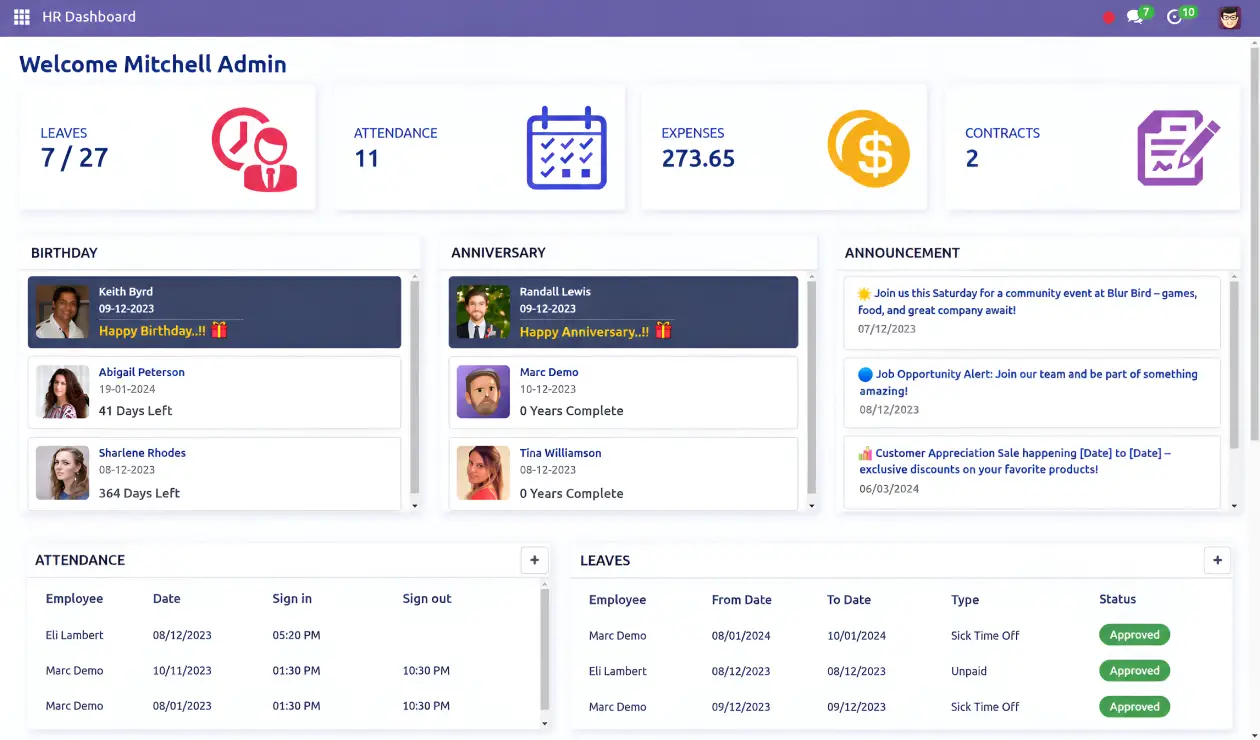
HR Dashboard
Every employee detail shows up in one dashboard, no digging required.
Manager Dashboard
Managers see their team's attendance, leave, and expenses in one view.
Employee Engagement Dashboard
Track recognitions, comments, and morale trends in one place.
Company Policy Management
Set and publish company or department policy in one place.
Employee Idea Management
Employees submit ideas, so good suggestions do not get lost.
Complaint Management
Log, track, and resolve employee complaints with a clear record.
Medical Examination Tracking
Get notified automatically before an employee's medical checkup is due.
HR Expense Management
Cancel or reset employee expense claims when something needs correcting.
Get a Custom HRMS Walkthrough for Your Team
The Payoff
What You Gain with the Right HRMS
A good HRMS does more than store data. Here is what actually changes for your team once it is in place.

Employees Who Feel Heard
Employees get a real place to raise ideas and complaints, not just a suggestion box nobody checks.

Secure, Centralized Data
Employee data stays in one secure system, not spread across files and drives.

Faster, Clearer Decisions
Dashboards give you the numbers you need, instead of reports built by hand every month.

Less Manual Work
Hours that used to go into manual payroll and attendance work get saved every week.

Fewer Payroll Mistakes
Numbers are calculated and approved inside one system, not double-checked by hand.

Clear Attendance and Leave Tracking
Get a clear view of who is in, who is out, and who is on leave, without chasing anyone.
Why Softhealer
Why Businesses Trust Softhealer for HRMS
Plenty of HR software looks similar on paper. What actually matters is what happens after you buy it and who's behind it.

11+ Years
of industry experience

5.0

rating on Google

96%
client retention rate
| -- | Generic HR Software | Softhealer HRMS |
|---|---|---|
| Implementation support | Self-setup, limited help | Hands-on, guided setup |
| Customization | Fixed, rigid structure | Built around your process |
| Dashboards | Basic reporting only | HR, manager, and engagement views |
| Integrations | Often limited or paid add-ons | Built-in WhatsApp, email, and Excel/CSV support |
| Employee support tools | Rarely included | Idea and complaint management built in |
| Ongoing support | Slow, ticket-based | Dedicated team |
Case Study
Real Results from Teams Using Our HRMS
See how real teams cut manual HR work, moved faster, and got more done after switching to our HRMS.
Healthcare Revenue Cycle Management, Florida, USA
Billed Right grew past 700 employees with no single system tying together employee records, time off, recruitment, and performance reviews. Work was assigned manually, and managers had little visibility into daily activity.
We built them a centralized system to run their entire workforce from one place, with approvals and task tracking handled automatically instead of chased over email.
"Their expertise helped us simplify our daily work. It improved task sharing among staff and reduced manual work across teams."
THE RESULTS:
Frequently Asked Questions
Everything you need to know before getting started.
Still have questions? Contact usA human resource management system, or HRMS, is software that manages core HR tasks like payroll, attendance, leave, and employee records in one place.
HRIS mainly stores employee records. HRMS adds operational tools like payroll and attendance on top of that. HCM goes further, adding workforce planning and long-term talent management.
Look for a system that covers payroll, attendance, and leave in one place, is easy for employees to use themselves, and can be set up around how your team already works.
An HRMS calculates payroll automatically, moves payslips through proper approvals, and keeps records in one system, so errors and missed compliance steps happen less often.
Yes. The system includes custom and extra fields, so it can be set up to match how your HR team already works.
Yes. Employees can view their own records and receive payslips directly by email or WhatsApp.
